4 workflows, 1 signal: a HubSpot system that maintains itself
A demo HubSpot build: four workflows triggered by a single signal, deal stage changes, that flag stale deals, fix associations, and record key dates with zero added rep work.
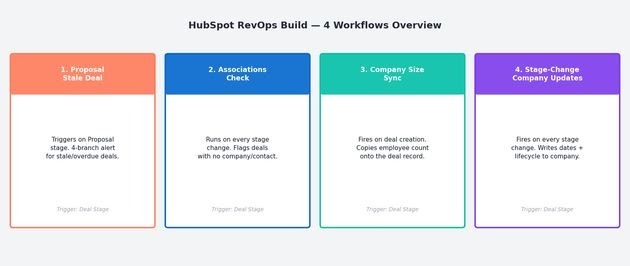
TL;DR
I built this as a demo to show how I approach HubSpot CRM architecture from scratch.
The core insight: reps already move deals through stages. Every workflow I built fires on that one signal. The result is a pipeline that flags stale deals, updates company records, enforces data quality, and writes key dates automatically. Zero additional rep behavior required.
flowchart TD
    A[Deal stage change] --> B[Proposal stale-deal check]
    A --> C[Association validation]
    A --> D[Company size population]
    A --> E[Stage-change company updates]
The company and the CRO
The company this build is designed for: a B2B data tool company, Series B, 60 to 100 employees, with a sales team of 8 to 12 reps. HubSpot has been live for about a year. The data is inconsistent. The pipeline is technically there, just not trustworthy.
What makes this company’s pipeline different from a standard SaaS setup: they run multiple deals at the same account. A company that lost a deal 14 months ago is now back with a new team, a new budget, and a new use case. An existing customer opens a second deal for a different product line. The pipeline doesn’t have one deal per company. It has a history, and none of that history is connected.
The person sitting across from this problem is the VP Sales. Reports to the CEO. Runs the Sunday pipeline review. Owns the board prep numbers.
Their specific situation:
- They open HubSpot on Sunday morning looking for one number. It takes 10 minutes and they still aren’t sure it’s right.
- A deal went quiet. They found out when the CEO asked about it in a board prep call, not because any system flagged it.
- A new deal opens at a company that lost 18 months ago. The AE has no idea why it was lost or who the main contact was. That information exists in the old deal. Nobody passed it forward.
- Every board deck means pulling from HubSpot, a Google Sheet, and a Notion doc that hasn’t been updated since last quarter. Three hours of stitching.
They have told their team to update the CRM. The team hears it as a task with no clear purpose, does it inconsistently, and the data stays unreliable. The VP knows the problem isn’t effort. They just haven’t found a fix that doesn’t depend on reps changing how they work.
Why this project
CRM problems at most early-stage companies are not tool problems. The tool is fine. The problem is that the system depends on reps to manually update fields they have no reason to care about. So fields go empty, dates don’t get logged, and the VP Sales is cleaning CRM data on Sunday morning so the pipeline review makes sense on Monday.
I wanted to show how I would set up HubSpot if I walked into a company that had it but wasn’t getting value from it.
The problem
Here is what I typically find in a HubSpot instance that has been “in use” for 12 months:
- Deals in Proposal with no close date and no activity for 12 days. Nobody flagged them. The first time anyone noticed was when the CEO asked about one during board prep.
- Deals with no associated contact or company. Pipeline reports are unreliable as a result.
- Company records that look the same whether the deal closed 3 months ago or was never touched. Key dates (Discovery call, proposal sent, close) are nowhere on the company object.
- No way to answer “what’s our average time from Discovery to close?” without pulling from HubSpot, a Google Sheet, and a Notion doc last updated three months ago. Every board deck meant three hours of stitching.
The fix people usually try: asking reps to fill in the fields. That doesn’t work. Reps update what they have to update. Everything else becomes optional, and optional means inconsistent.
The insight
Reps move deals through pipeline stages. They have to. The kanban view only shows a deal in the right column if the stage is current. That is the one thing you can count on, so I triggered everything off the stage change, not off a field reps have to remember.
What I built
Part 1: Proposal stale deal
The problem it solves: Deals reaching Proposal stage were going quiet with no close date, no task, and no alert. The first time anyone noticed was in a board prep call.
How it works: Triggers when a deal enters Proposal stage. Runs a 4-branch diagnostic based on what is actually wrong with the deal:
- No Contact Associated: creates a task to link a contact before anything else happens.
- No Close Date: creates a data quality task and flags the deal.
- Overdue (Close Date has passed): sets urgency to High, creates a follow-up task, sends an internal email alert to the deal owner.
- Stale (Close Date is future, no recent activity): sets urgency to High, creates a proactive check-in task.
Why the branching matters: A generic “stale deal” flag tells you a deal is old. This workflow tells you specifically what is wrong and what to do next. The rep gets a task with context. The manager gets an alert with context.
Part 2: Associations
The problem it solves: Deals were being created or moving forward without being properly linked to a company or contact. Any pipeline report segmented by company was unreliable because some deals were floating.
How it works: Triggers on every deal stage change. Checks whether the deal has at least one associated company and at least one associated contact. Sets a custom “Associations” property to True or False based on what it finds.
Why it matters: You can now filter your entire pipeline by Associations = False and get a clean list of every deal with a data quality problem. What was invisible and random becomes a manageable queue.
Part 3: Update company size on deal creation
The problem it solves: Company size lived on the company record, not on the deal. Segmenting the pipeline by company size meant a manual pull every time.
How it works: Triggers when a deal is created. Reads Number of Employees from the most recently updated associated company and writes it to the Company Size field on the deal. One action.
Why it matters: Every deal created from this point has company size populated without anyone touching it. You can segment pipeline by company size without a data project first.
Part 4: Stage-change workflow (company updates)
The problem it solves: Company records were static. A rep could run a full sales cycle and the company object would look identical to how it looked before the first call. No dates were logged. Lifecycle stage never updated. Measuring cycle time was impossible.
How it works: Triggers on every deal stage change. Branches across 5 pipeline stages and executes a specific sequence on the associated company record for each:
- Qualification: writes the Qualification Date to the company. Checks if there are multiple open deals at the same company and alerts the owner if yes.
- Discovery: writes the Discovery Call Date. A sub-branch flags deals stuck in Discovery over 30 days.
- Proposal: writes the Proposal Sent Date. Flags deals sitting in Proposal over 6 months.
- Closed Won: writes the Close Date, updates the company lifecycle stage to Customer, sends a Closed Won internal alert.
- Closed Lost: writes the Close Date, updates lifecycle stage, writes the lost reason to the company record for future reference.
Why it matters: Once this is live, the company record reflects reality without any rep input. A manager opens a company and sees when Discovery happened, when the proposal went out, and whether there are multiple deals in flight. And because the dates exist, you can measure: time in stage, cycle length, and stage conversion rates.
Results
What you can do after this build that you could not do before:
- Filter Proposal stage by Urgency = High to see stale and overdue deals without manual review
- Filter pipeline by Associations = False to see every deal with a data quality problem
- Report on Discovery Call Date vs. Close Date to calculate actual sales cycle length
- See company lifecycle stage update automatically as deals close, no manual entry
- Segment pipeline by company size from day one of the build